The Smart Home Maintenance Reality Nobody Warns You About After Year 3
Affiliate Disclosure: This article may contain affiliate links. Luxbrook earns a small commission on qualifying purchases at no additional cost to you. We only recommend products we have independently researched and believe offer genuine value.
Smart home systems look effortless in year one. By year three, you are dealing with dead batteries, discontinued apps, broken integrations, and devices that stopped talking to each other. Here is what to expect and how to plan for it.
Nobody writes about what a smart home is like in year three. The reviews cover setup. The YouTube videos cover the first week. The manufacturer's marketing covers the promise. What they do not cover is the Tuesday morning when three automations have stopped working, two devices are offline, and you have no idea why.
This is not a failure of smart home technology. It is the predictable result of building a system on consumer electronics that were designed for a 2-year product cycle, connected to cloud services that get updated without your consent, running on a Wi-Fi network that has changed since installation.
If you are planning a serious smart home installation — or if you are already in year two — here is what to expect and how to plan for it.
The Battery Problem
A typical smart home installation includes 15–40 battery-powered devices: door sensors, motion sensors, smart locks, remote controls, and leak detectors. Most use CR2032, AA, or AAA batteries with a rated life of 1–2 years. In practice, cold temperatures, frequent triggering, and firmware updates that increase polling frequency can cut battery life in half.
By year three, you are replacing 10–20 batteries per year. This is not a crisis, but it is a maintenance burden that nobody mentions during the sales process. The devices that die silently — a door sensor that stops reporting, a motion detector that stops triggering — are the dangerous ones, because you do not know they have failed until you need them.
The solution is a battery monitoring dashboard. Both Apple HomeKit and Home Assistant expose battery levels for connected devices. Set up a weekly automation that sends you a notification listing any device below 20% battery. This turns reactive maintenance into scheduled maintenance.
The Cloud Dependency Problem
Most consumer smart home devices depend on manufacturer cloud servers for their core functionality. When the manufacturer updates their API, changes their authentication system, or discontinues a product line, integrations break. This has happened repeatedly: Wink's cloud shutdown in 2023 bricked thousands of hubs, SmartThings has broken integrations with multiple device categories through API changes, and Insteon's bankruptcy in 2022 left users with devices that still work locally but have no cloud control.
> The most resilient smart home architecture is one where local processing handles all time-sensitive automations and cloud connectivity is used only for remote access. If your internet goes down and your automations stop working, you have a cloud dependency problem.
The Wi-Fi Drift Problem
Wi-Fi networks change. You replace your router, change your password, add a mesh node, or switch ISPs. Every one of these changes can break Wi-Fi connected smart home devices, because most of them store the network credentials in firmware and require a manual re-pairing process to update them.
A 50-device smart home can take 4–6 hours to re-pair after a router replacement. This is not hypothetical — it is the experience of every serious smart home owner who has upgraded their network infrastructure.
The mitigation is to use a dedicated IoT VLAN with a fixed SSID and password that you never change, even when you upgrade your router hardware. Keep your personal devices on a separate network. When you replace the router, configure the IoT SSID first before touching anything else.
The Discontinued App Problem
Consumer electronics companies discontinue apps. The Wink app is gone. The Iris app is gone. The Staples Connect app is gone. If your smart home depends on a manufacturer's app for its core functionality, you are one business decision away from losing that functionality.
The hedge is to use a platform-agnostic hub — Apple HomeKit, Home Assistant, or Amazon Alexa — as your primary control layer, with manufacturer apps as a secondary configuration tool only. When a manufacturer discontinues their app, your automations continue working through the platform hub.
Practical Maintenance Schedule
1. Monthly: Check battery levels on all battery-powered devices. Replace anything below 20%. 2. Quarterly: Test all automations manually. Run through your morning routine, departure routine, and arrival routine to confirm they execute correctly. 3. Annually: Audit your device list. Identify any devices that are no longer supported by their manufacturer and plan replacements. 4. After any network change: Re-pair all Wi-Fi devices before assuming they are working. 5. After any firmware update: Test the automations that involve the updated device.
Product Recommendations
For a maintenance-aware smart home, the Aeotec Smart Home Hub (the successor to SmartThings) supports Z-Wave and Zigbee locally, reducing cloud dependency for time-sensitive automations. It is the most practical path to local processing for homeowners who do not want to run Home Assistant.
For battery monitoring, the Aqara Hub M2 supports local HomeKit processing and exposes battery levels for all connected Aqara devices through the Home app. Pair it with a HomeKit automation that notifies you of low battery devices weekly.
FAQ
How long do smart home devices last? Consumer smart home devices typically have a useful life of 3–7 years before battery degradation, discontinued software support, or hardware failure requires replacement. Professional-grade systems from Crestron and Control4 are designed for 10–15 year lifespans.
What happens when a smart home manufacturer goes out of business? Devices that depend on cloud servers for core functionality stop working. Devices that support local protocols (Z-Wave, Zigbee, HomeKit) continue working through third-party hubs. This is the primary argument for using open protocols over proprietary cloud-dependent systems.
How do I future-proof my smart home? Use devices that support open protocols (Z-Wave, Zigbee, Matter, HomeKit) rather than proprietary cloud systems. Keep a local hub (Home Assistant or HomeKit hub) as your primary control layer. Avoid devices that require a manufacturer cloud subscription for basic functionality.
Why do my smart home automations stop working randomly? The most common causes are: dead batteries in trigger devices, Wi-Fi network changes, manufacturer API updates, and firmware updates that change device behavior. A systematic troubleshooting approach — check batteries first, then network connectivity, then cloud service status — resolves 90% of issues.
Is Home Assistant worth the complexity for a luxury home? For homeowners who want maximum reliability and local processing, yes. For homeowners who want a managed experience without technical maintenance, a professional Control4 or Crestron installation with a service contract is a better fit.
Shop the Article
As an Amazon Associate, Luxbrook earns from qualifying purchases.
Products Mentioned in This Article
Affiliate links · seperts-20
Climate Control
ecobee Smart Thermostat Premium
The most advanced smart thermostat with built-in Alexa and air quality monitor.
Smart Hubs
Amazon Echo Hub
8" smart home control panel with Alexa. Control all your devices from one screen.
Smart Speakers
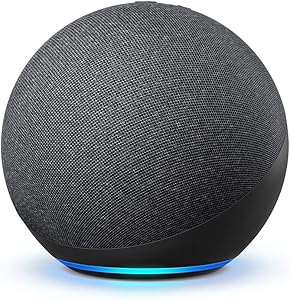
Amazon Echo (4th Gen)
Premium sound with Alexa and smart home hub built in.
As an Amazon Associate, Luxbrook earns from qualifying purchases at no extra cost to you.
Related Articles

Rate This Article
Discussion
No comments yet — be the first to share your thoughts.